
王苏洋Blog
折腾不止,记录不停

1
日常
严选优品,精准分类

凌晨1点,你刷完最后一条短视频,心里空落落的。 今天又“充实”地过去了——听了两本书的解读,收藏了5个健身视频,回了3个工作群的消息。但躺在床上,你问自己:我今天到底完成了什么? 明明比谁都忙,却比谁都慌。你不是一个人。 我们活在一个“努力通货膨胀”的时代。 以前每天背20个单词叫努力,现在得打卡1
趁着这两天休息,简单折腾一下博客,更换了新的简约风格主题,完善页面细节 新主题自带功能有限,很多常用页面都没有添加需要自己补充。趁着这两天休息空闲,陆续完善了博客友链、归档、等基础页面😊

最近这段时间的状态,说实话,有点乱。 之前不是刚写过一篇“终于找到工作了”的文章吗,当时还挺开心的,感觉生活好像终于要回到正轨了。结果……现实很快就给我泼了盆冷水。 那份工作,我只干了一个星期,就跑路了。 原因也不复杂,就是那种典型的“想象很美好,实际很窒息”。每天上班都在消耗自己,学不到东西,环境

当前,博客仿佛已然变成一个略显陈旧的词汇了。受到短视频以及社交媒体所带来的猛烈冲击,人们大多更倾向于花费几分钟的时间去浏览若干条动态内容,而绝非是安安静静地去阅读一篇篇较长的文章。自建博客的人可以说是少之又少了,毕竟要搭建并维护起一个独立的网站,那可是需要耗费大量的时间、精力以及具备相应技术的,这显
2
随笔
严选优品,精准分类
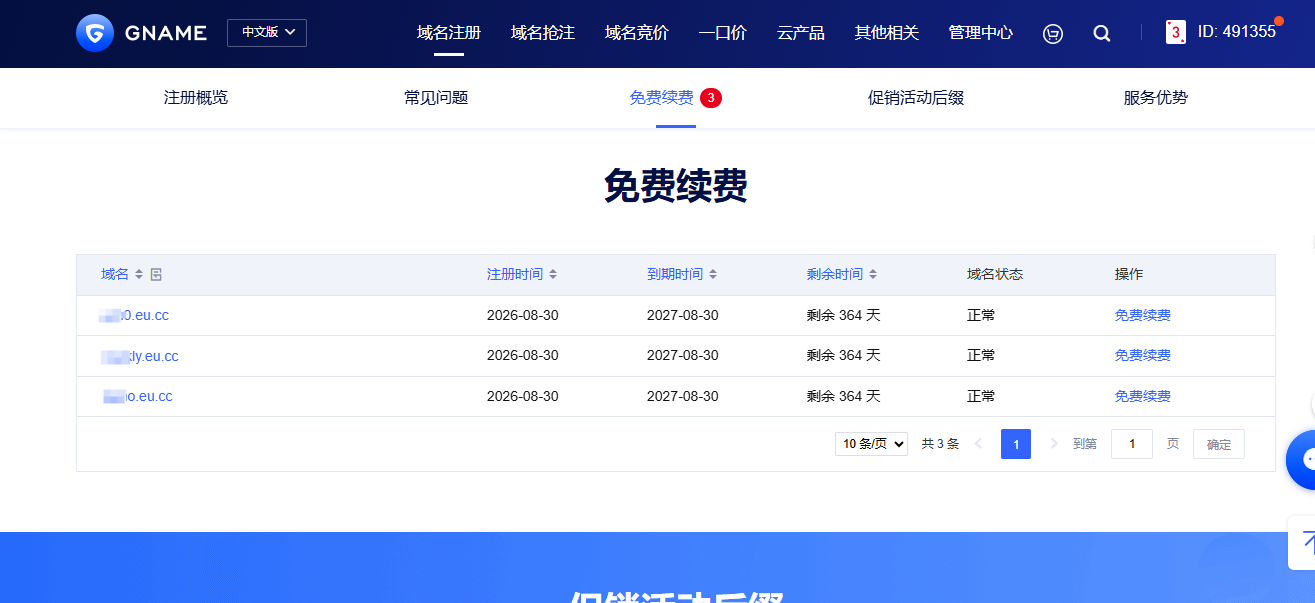
本文介绍Gname推出的.eu.cc免费域名:普通账号可领3个全额抵扣券,注册与续费均免费,支持自定义DNS并接入Cloudflare,适合个人博客、项目演示等。需注意溢价域名不可免费,续费须在到期前90天内从活动页提交,抵扣券30天有效。文章还提供六步注册流程,帮助零成本搭建个人站点。

摘要:本文介绍了在本地部署大模型的动机(隐私、网络、成本、折腾),对比了Ollama和LM Studio两款工具,并以Ollama运行Qwen3为例展示了安装、拉取模型及API调用的完整流程。作者强调了量化显存、控制上下文长度、明确模型适用边界、善用系统提示词等实用经验,指出本地模型已具备实用价值,适合数据敏感或高频调用场景。

除夕了,却怎么也高兴不起来。日子像平常一样平淡,没有欣喜,也没有期盼。是年味淡了,还是期盼过年的人,已经不属于我们这代人了? 记得小时候过年,大年三十的晚上,早早地就把新衣服放在床边,把压岁钱压在枕头下,盼着赶快天亮。穿上新衣服去炫耀,拿着爸妈给的压岁钱,和同村小伙伴一起出去买烟花鞭炮,那种感觉永远
3
教程
严选优品,精准分类
本文介绍Gname推出的.eu.cc免费域名:普通账号可领3个全额抵扣券,注册与续费均免费,支持自定义DNS并接入Cloudflare,适合个人博客、项目演示等。需注意溢价域名不可免费,续费须在到期前90天内从活动页提交,抵扣券30天有效。文章还提供六步注册流程,帮助零成本搭建个人站点。
摘要:本文介绍了在本地部署大模型的动机(隐私、网络、成本、折腾),对比了Ollama和LM Studio两款工具,并以Ollama运行Qwen3为例展示了安装、拉取模型及API调用的完整流程。作者强调了量化显存、控制上下文长度、明确模型适用边界、善用系统提示词等实用经验,指出本地模型已具备实用价值,适合数据敏感或高频调用场景。

一、原价规避比价报大促3种方案 分类 活动编码 操作步骤 适用场景 平台搜索大促 20981/搜索大促 预留1个0库存本品SKU承接比价,其余SKU更换高价图并修改SKU名称;报名审核通过后修改在售SKU售价、换回产品预览图,等待24~48h生成大促横幅 日常主推爆款,追求大流量 三单挑战 2237

个人博客要怎么优化,才能提升访客的阅读体验。我试过无数的优化方案,踩过无数的坑,最后发现,最好的优化,从来不是加更多的功能,而是做减法。 这里给大家分享5个我亲测有效、而且极其简单的博客优化建议,不用写复杂的代码,不用花大量的时间,就能让你的博客体验提升一大截。 1. 砍掉90%的非必要插件 这是我
4
记录
严选优品,精准分类
一、原价规避比价报大促3种方案 分类 活动编码 操作步骤 适用场景 平台搜索大促 20981/搜索大促 预留1个0库存本品SKU承接比价,其余SKU更换高价图并修改SKU名称;报名审核通过后修改在售SKU售价、换回产品预览图,等待24~48h生成大促横幅 日常主推爆款,追求大流量 三单挑战 2237
趁着这两天休息,简单折腾一下博客,更换了新的简约风格主题,完善页面细节 新主题自带功能有限,很多常用页面都没有添加需要自己补充。趁着这两天休息空闲,陆续完善了博客友链、归档、等基础页面😊
最近这段时间的状态,说实话,有点乱。 之前不是刚写过一篇“终于找到工作了”的文章吗,当时还挺开心的,感觉生活好像终于要回到正轨了。结果……现实很快就给我泼了盆冷水。 那份工作,我只干了一个星期,就跑路了。 原因也不复杂,就是那种典型的“想象很美好,实际很窒息”。每天上班都在消耗自己,学不到东西,环境

来浙江已经七八天了,说长不长,说短也不短,但对我来说,这几天却像被拉长了一样。 刚到的时候,心里其实挺期待的,总觉得外面的机会多,只要肯努力,总能找到一份合适的工作。可现实却没那么简单。每天不是在找工作,就是在去面试的路上,有时候一天跑好几个地方,结果却一个都没下文。人也慢慢从一开始的兴奋,变得有点

开这个站的念头,攒了快半年。 总觉得自己现在过的生活都是嘈杂和喧嚣的。在刷短视频的时候,忽然发现自己的手指不听使唤了,一直在乱划;刷到什么动态,总会想:下一条呢?这条不是更好玩一点吗……有时会有停下来、整理下自己之类的念头冒出脑海,但把手机翻个底朝天,也没找到一块可以静心写字的地方。后来不知道哪来的


